
Excel Skills vs Soft Skills: What Recruiters Actually Look For
Quick answer: Recruiters look for both. Excel skills for jobs show you can work with data, while communication, teamwork and problem-solving show you can turn that data into decisions with other people. Which one carries more weight depends on the role, so the strongest candidates prove both on their resume and in interviews.
In this guide
- Why do technical and interpersonal skills both matter at work?
- Are Excel skills important for getting a job?
- What Excel skills do employers look for?
- Which soft skills do recruiters look for?
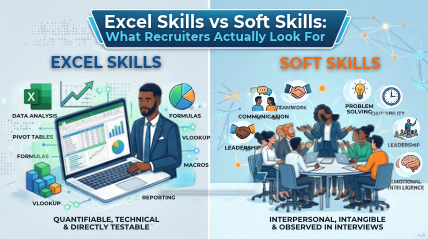
- Excel skills vs soft skills: side-by-side comparison
- Which skills matter most for specific roles?
- What Excel skills should I put on my resume?
- How do you show both skill types in interviews?
- Why are Excel and communication skills important at work?
- How can you build both skill sets in Chennai?
- FAQs
Why Do Technical and Interpersonal Skills Both Matter at Work?
Picture two candidates in a Chennai hiring round.
- One builds a flawless report in minutes but can’t explain it to the manager.
- The other talks beautifully but spends an afternoon cleaning a simple sheet.
Who gets the offer? Honestly, neither is a sure thing, and that’s the point.
The debate around technical skills vs soft skills is usually framed as a contest. In real hiring, it is not. Technical skills get your work done. Interpersonal skills get your work noticed, understood and used. Together they make up what recruiters call employability skills: the mix that makes someone productive in week one and easy to work with for years.
So instead of asking “which is better?”, ask “what does this role need, and can I show both?” Strong workplace Excel skills plus people skills answer that question, and Excel skills for jobs are simply the easiest half to prove on paper.
Are Excel Skills Important for Getting a Job?
Short answer: yes, for a very large share of office roles. Finance, HR, sales, operations, logistics, marketing and MIS teams use spreadsheets every day to track, report and decide. That’s why Excel skills for jobs keep showing up in job descriptions, even for roles that don’t sound “technical.”
Here’s what recruiters usually want to see:
- Everyday spreadsheet basics: sorting, filtering, formulas and clean formatting
- Real Excel proficiency: specific, demonstrable skills instead of “familiar with MS Office”
- Speed and accuracy: because one wrong number damages trust fast
For beginners, Excel skills for freshers work as a genuine tie-breaker. Two graduates with similar marks? The one who can show a working dashboard or a cleaned dataset often gets shortlisted first. Experienced hires are no different:
Excel skills for professionals are assumed in most finance and operations roles, and they’re checked early. Recruiters also read your employability skills as a package, so match the Excel skills employers look for with clear people skills. Excel opens the door; people skills help you walk through it.
What Excel Skills Do Employers Look For?
Ask ten recruiters and you’ll hear a very similar list. These are the Excel skills employers look for most often:
1. Formulas and functions
Formulas are the foundation. Employers expect you to use SUM, IF, SUMIFS, COUNTIFS and lookups like VLOOKUP or XLOOKUP without searching for every step. Example: a sales coordinator uses SUMIFS to total regional sales in seconds instead of adding numbers by hand.
2. PivotTables and data analysis
PivotTables turn thousands of rows into a clear summary in a few clicks. Real Excel proficiency shows when you can slice data by month, product or region and spot what’s changing. Example: an HR executive builds a PivotTable of attrition by department for the monthly review.
3. Charts and dashboards
A chart is a story told with data. The Excel skills employers look for here are simple: the right chart type, clear labels and zero clutter, so a manager understands it in ten seconds.
4. Data cleaning
Real data is messy: duplicates, extra spaces, mixed date formats. Tools like Remove Duplicates, TRIM, Text to Columns and Power Query save hours and prevent wrong conclusions. Many managers quietly rate this the most underrated skill.
5. Advanced Excel skills
For analyst and MIS roles, advanced Excel skills go further: Power Query, dynamic arrays, macros and data models. These show you can automate a weekly report instead of rebuilding it every Monday. For working people, Excel skills for professionals increasingly mean exactly this, and advanced Excel skills are often what separates a good profile from a great one.
Which Soft Skills Do Recruiters Look For?
1. Communication skills
Can you explain your numbers to someone who doesn’t love numbers? Recruiters judge this by how you answer, not just what you answer: clear, structured and short.
2. Teamwork skills
Most work is shared work. Teamwork skills show up as meeting deadlines other people depend on, sharing files cleanly and giving credit. Recruiters listen for “we” and “I” in the right places.
3. Problem-solving skills
Problem-solving skills mean breaking a messy issue into steps and fixing the root cause. Interviewers often hand you a scenario and simply watch how you think.
4. Time management skills
Time management skills show in how you prioritise, estimate and deliver. A report that is perfectly right but two days late still causes problems.
5. Adaptability
New tools, new managers, new targets. Adaptability tells a recruiter you’ll pick up Copilot or a new ERP without drama.
Excel Skills vs Soft Skills: Side-by-Side Comparison
Here is how technical skills vs soft skills compare in everyday hiring. Neither column wins; they do different jobs.
| Factor | Excel skills | Soft skills |
| What it proves | You can work accurately with data | You can work effectively with people |
| How recruiters check it | Practical test, resume keywords, case task | Behavioural questions, group discussion |
| How to show it | Dashboard, cleaned dataset, named functions | Short stories with outcomes |
| Example in action | Building a PivotTable summary | Explaining that summary to a manager |
| How to improve it | Hands-on practice with real data | Feedback, mock interviews, team projects |
| Where it matters most | Analyst, finance, MIS, operations | Client-facing, team lead, HR, support |
Which Skills Matter Most for Specific Roles?
The technical skills vs soft skills balance shifts by job, and Excel skills for jobs in finance look different from those in HR. Here are real-world examples:
- Fresher or graduate trainee: Excel skills for freshers (formulas, clean formatting) plus a willingness to learn. Recruiters hire for potential.
- Accounts and finance: Excel skills for professionals here mean reconciliations, lookups and PivotTables, with teamwork skills for month-end closing.
- HR executive: Attendance and attrition tracking, with strong people skills for sensitive conversations. Workplace Excel skills here are about accuracy and privacy.
- Sales and operations: Dashboards and forecasting, backed by time management skills during peak targets.
- MIS or data analyst: Power Query-level analysis and data cleaning first, then problem-solving skills to turn findings into action.
What Excel Skills Should I Put on My Resume?
Be specific, show proof and match the job description. Vague lines get ignored; precise ones get shortlisted. When you write your Excel skills for resume sections, follow this pattern:
- Name the functions: “XLOOKUP, SUMIFS, PivotTables, Power Query” beats “Advanced Excel.”
- Add a result: “Built a PivotTable dashboard that cut monthly reporting time from 6 hours to 2.”
- Mirror the posting: if the role says “data cleaning,” use those words, along with the Excel skills employers look for in that listing.
- Be honest about level: list Excel proficiency as basic, intermediate or advanced, because interviewers will test it.
- Students: add a mini-project, since Excel skills for freshers are best proven with one real file.
Strong Excel skills for resume lines pair a tool with an outcome. Weak ones just list software. And one good Excel skills for resume bullet backed by a portfolio file is worth more than ten buzzwords.
How Do You Show Both Skill Types in Interviews?
Use a simple three-part story: problem, Excel action, team result.
Example: “Our monthly sales report took two days and had frequent errors (problem). I cleaned the data with Power Query and built a PivotTable summary (Excel action). I walked the team through it, and we now finish in half a day (team result).”
Notice how one story proves Excel skills and communication skills at once. Practise two or three of these, and be ready to defend every Excel skills for resume line you wrote. Teamwork skills show when you credit the group, and problem-solving skills show when you explain how you found the root cause.
For practical tests, keep formulas clean, label your sheets and explain your steps out loud. Excel skills for freshers and Excel proficiency at any level are judged on your thinking as much as your answer.
Why Are Excel and Communication Skills Important at Work?
Because data on its own changes nothing, and Excel skills for professionals only create value when others act on the output.
Imagine an analyst who finds that one product line is losing money. Without clear communication skills, the finding sits in a spreadsheet. Without workplace Excel skills, there’s no finding at all. Add problem-solving skills, and the team can decide what to do next.
This is why employers list technical skills vs soft skills together in job descriptions. Companies want neither a spreadsheet robot nor a great talker with no numbers. They want people who can do both, and Excel skills for jobs paired with employability skills is simply the name for that combination.
How Can You Build Both Skill Sets in Chennai?
You don’t need to choose. You need a plan to build employability skills: practise Excel on real datasets, and practise explaining your work out loud.
At Excel Prodigy, Chennai learners get hands-on training from Microsoft Certified Trainers. With 13+ years of experience and 50,000+ professionals trained, our programmes use real business scenarios, so you build Excel skills for jobs, group projects that sharpen teamwork skills, and timed tasks that train time management skills.
Whether you need workplace Excel skills for your first role, Excel skills for professionals switching teams, or advanced Excel skills for a promotion, browse our Excel training courses and pick the level that fits you.
Ready to get hired with confidence? Talk to our team and start building the skills recruiters notice.
FAQs
1) What Excel skills do employers look for?
The Excel skills employers look for most are formulas, PivotTables, data analysis, charts and data cleaning. For analyst roles, they also expect advanced Excel skills such as Power Query and automation.
2) Are Excel skills important for freshers?
Yes. Excel skills for freshers stand out most in finance, operations and MIS hiring, and Excel skills for jobs like these work best alongside clear communication.
3) Which is more important, Excel skills or soft skills?
Neither is universally more important. The technical skills v s soft skills balance depends on the role: analyst jobs lean technical, client-facing jobs lean on people skills. Most roles need both, which is why employability skills combine them.
4) How do I show soft skills on a resume?
Use short, outcome-based bullets, such as “led a four-member team to deliver a report two days early.” Then back them up with stories in the interview, next to the Excel skills for resume section.
5) How long does it take to build job-ready Excel skills?
Excel proficiency depends on where you start and how much you practise. Training with real datasets and regular practice speeds it up, and good time management skills help you stay consistent.
6) Where can I learn Excel in Chennai?
Excel Prodigy offers instructor-led Excel training in Chennai with Microsoft Certified Trainers, focused on practical workplace Excel skills and Excel skills for jobs.
