
Best 10 Power BI Training Tips for Absolute Beginners
If you are new to business analytics, Power BI is one of the easiest and most impactful tools to begin with. Yet many beginners feel overwhelmed by its features and do not know where to start.
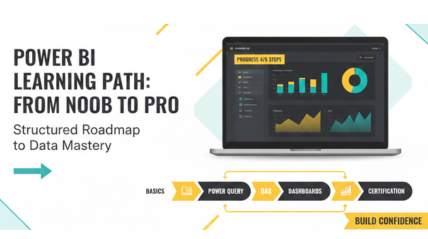
With structured guidance and the right Power BI training tips for beginners, you can learn step-by-step, avoid confusion, and quickly build confidence, just like Excel Prodigy’s beginner-friendly approach.
Before diving in, beginners often struggle with an overwhelming interface, unclear concepts, random tutorials, poor visualization choices, lack of practice data, and no roadmap. Let’s address these challenges step by step.
1. Start with Power BI Basics: Know Your Interface
Before exploring formulas or dashboards, start with Power BI fundamentals. Get familiar with the three main views: Report, Data, and Model, and understand the workflow: Get Data → Transform → Model → Visualize. This foundation makes your overall learning process much easier.
Quick Example:
Open an Excel file, load it into Power BI, and explore columns, tables, and the Fields pane.
Beginner Tip:
Don’t rush into complex features. Use this stage to build familiarity with what Power BI can do. This forms the foundation of any strong Power BI beginner guide.
2. Learn Power Query Early; Cleaning Data is Half the Work
Most real-world datasets are unorganized and inconsistent, making analysis difficult. That’s why learning Power Query at the beginning is one of the best Power BI tips for beginners. It allows you to clean, transform, and structure your data properly, ensuring smoother and more accurate analysis later.
What You Should Learn First:
- Removing duplicates
- Splitting columns
- Merging datasets
- Replacing errors
- Understanding “Applied Steps”
Once you learn Power BI basics, managing any dataset becomes far simpler, allowing you to clean, shape, and prepare information more confidently and efficiently for analysis.
Pro Tip:
Practice cleaning simple Excel tables. Power BI tutorials will become your best friend as you scale.
3. Practice DAX Using Simple Formulas First
DAX (Data Analysis Expressions) may seem tougher at first, but it becomes much easier when you start with the basics. Instead of rushing into complex functions, begin with simple formulas and gradually build your understanding. This slow, steady approach of Power BI tips and tricks helps you grasp core concepts clearly and boosts your confidence as you progress..
Begin with:
- SUM
- COUNTROWS
- AVERAGE
- CALCULATE (once you’re comfortable)
These functions form the core of all analytics. Building a solid DAX foundation early on strengthens your overall learn Power BI basics journey and ensures smoother, more effective progress in the long run.
Mini Exercise:
Create a “Total Sales” measure using SUM. That’s your first step toward data storytelling.
4. Use Real Datasets; Practical Exposure is Vital
A common mistake beginners make is practicing only with mock or sample data. To gain true insight, work with real-world public datasets instead. This hands-on experience enhances your understanding of data patterns, improves problem-solving skills, and helps you tackle practical challenges, making your Power BI learning journey more effective and realistic.
Try datasets like:
- Superstore Sales (Kaggle)
- FIFA Player Stats
- Starbucks Locations
- Your own office/academic data
Using real datasets provides practical experience in data cleaning, modeling, and visualization, which is essential for building strong foundational skills and forms a core component of any effective Power BI beginner guide.
5. Build a Mini Dashboard Every Week
Consistent, hands-on practice is the quickest way to strengthen your Power BI skills. By building a small dashboard of Power BI tips and tricks each week, you reinforce all the concepts you have learned, from creating visuals and writing DAX formulas to formatting reports and crafting a compelling data story. This approach steadily builds confidence and proficiency over time.
Regularly practicing by creating dashboards not only enhances your technical skills but also boosts your confidence in learn Power BI basics. Over time, this consistent approach helps you master dashboard design, visualization techniques, and data storytelling, making you more proficient and comfortable in applying your knowledge to real-world projects and analytics tasks.
6. Explore Power BI Community & Forums
A highly overlooked yet valuable Power BI learning roadmap tip is engaging with the community. Online forums and groups feature thousands of professionals who share dashboards, practical DAX formulas, real-world solutions, and troubleshooting techniques. By observing and interacting with Power BI tutorials experts, beginners can learn faster, discover creative approaches, and solve common challenges more efficiently.
Useful communities:
- Microsoft Power BI Community
- Reddit r/PowerBI
- Stack Overflow
- LinkedIn groups for analytics learners
By engaging with the Power BI dashboard training, you can discover useful shortcuts, clever visualization techniques, and efficient data modeling strategies that streamline your workflow and save significant time during analysis.
7. Follow the Tutorials from Certified Trainers
Power BI for Beginners often get lost with random YouTube tutorials, which can be inconsistent and overwhelming. Following certified trainers ensures you learn concepts in a logical, step-by-step sequence, based on experience rather than trial and error.
Structured programs like Excel Prodigy’s Power BI course provide a guided learning path, covering everything from basics to DAX, data modeling, and publishing, all reinforced with hands-on practice using real datasets.
Remember:
Structured learning > scattered learning.
8. Learn Visualization Practices through a Clear Story
Power BI for beginners goes beyond creating charts, it is about conveying insights through effective visual storytelling. Beginners often make the mistake of cluttering dashboards or choosing inappropriate visuals, which can confuse viewers and dilute the message.
Clear, purposeful visuals make data easier to understand and act upon.
Best Practices for Beginners:
- Use bar charts for comparisons
- Use line charts for trends
- Use KPIs for key metrics
- Use maps only when location matters
- Use slicers for easy filtering
A well-organized dashboard ensures your audience easily understands the data instead of feeling overwhelmed. Mastering this clarity is an essential step in any effective Power BI learning roadmap.
9. Focus on Data Modeling Early
Data modeling forms the core of Power BI. A well-structured model ensures dashboards update accurately, relationships between tables work correctly, and DAX formulas produce reliable results. Without proper modeling, your reports can break, show incorrect data, and hinder effective analysis.
Concepts to Learn Early:
- Relationship types (One-to-many, Many-to-one)
- Star schema vs. snowflake schema
- Importance of a Date Table
- Fact vs. dimension tables
Many beginners find DAX challenging due to poorly structured data models. By building a strong, well-organized model first, DAX calculations become easier, and the overall Power BI learning roadmap flows more smoothly.
10. End with a Guided Course or Certification Path
Many beginners find DAX challenging due to poorly structured data models. By building a strong, well-organized model first, DAX calculations become easier, and the overall Power Power BI training tips for beginners process flows more smoothly.:
- Avoid common mistakes
- Learn faster with expert support
- Work with industry datasets
- Build professional-level dashboards
- Prepare for certifications
For a trustworthy starting point, Excel Prodigy’s Power BI beginner program provides instructor-led, practical training tailored for students, working professionals, and corporate teams, ensuring hands-on experience, structured learning, and a smooth journey into building effective dashboards.
Final Thoughts
Learning Power BI is much easier and more enjoyable when you follow the correct sequence. With Excel Prodigy’s Power BI training tips for beginners, you can establish solid fundamentals, gain practical experience, and start building insightful, professional dashboards more quickly than you ever expected.
Ready to take the next step?
Join Excel Prodigy’s live Power BI Fundamentals class to learn directly from certified trainers.
Frequently Asked Questions
- How do I start learning Power BI?
Start with Power BI Desktop basics, explore data views, and practice simple Power Query and DAX formulas. - Is Power BI easy to learn?
Yes, with a structured approach and hands-on practice, beginners can quickly create dashboards. - Do I need coding to learn Power BI?
No, basic formulas (DAX) and Power Query are enough; coding isn’t required. - How long does it take to master Power BI?
Basics take 2–4 weeks; advanced skills may take a few months of practice. - How can I get Power BI certification?
Follow a guided learning path, practice real projects, and attempt Microsoft’s PL-300 exam.


